Wednesday, 27 April 2016

Facebook Signup & Login Page's

Facebook Signup & Login Page's

Whenever there is a discussion about social networking sites, the name that is heard more is Facebook. It is worlds NO.1 social networking site at present which has users more than twitter and Google +. Just in few years of time it gained attention of many Internet users from each and every corner of the world with its unique features. There are almost 900 + million Facebook users till now according to the recent statistics. Starting from a School going children to the Old grannies, everyone is using Facebook accounts these days. If you haven’t created a Facebook account yet, then you are on a right spot. This post will let you know about “How to create a Facebook account” and ”How to login into Facebook account” using detail screen shots.
  • Must Read:Best Facebook Tricks 2013.

Before starting first let me clear you two things:

  • Sign up Facebook – Creating a Facebook account
  • Login Facebook – After login into your Facebook you can access your Facebook account.

How to Signup Facebook account:

You can sign up for a new Facebook account absolutely for free. As Facebook says “It’s free and always will be”.
Follow these steps to create a Facebook account within few steps. Check the screen shots clearly and you won’t get any confusion.
1. Go to www.facebook.com
2. On the home page itself you will see a page for signup. Enter all your details as mentioned below.
Facebook Login/Signup Page
  • In the first 2 boxes present at the first row enter your name followed by your surname.
  • In the Boxes present in the 2nd and 3rd row enter your email address (Not a fake one). You will get all notifications to your email, so make sure that you enter correct email address there
  • Enter your Password in the box, make sure that you set a strong password instead of your mobile number or any others name.
  • Choose your Date of birth and select male or female according to your sex.
3. After entering all your details click on SIGN UP.
4. Now you are just three steps away. You will see a page similar to the screen shot below
Step 1: Enter your email address and click on FIND FRIENDS button. Through this you can search your friends on your email address on Facebook easily. If you don’t want this to be done, you can just simply click on SKIP
Step 2: In this step you can search your friends from your school and collage easily. When I created my Facebook account, I found many of my friends through this step. So instead of skipping it, just search your school or college in the input boxes and find your friends on Facebook. You can skip this step by clicking on SKIP.
Step 3: In this final step you need to upload a Profile picture. Profile picture is the image that is shown on your profile indicating you, so please upload your real image and click on SAVE & CONTINUE.
That’s it . . . ! Now your Facebook account is created successfully.

How to LOGIN into Facebook account:

Signing up a Facebook account takes much time. But, it won’t take much time to login into your Facebook account.
1. Go to www.facebook.com
2. Enter your email address and password that you used while creating your Facebook account and click on LOGIN.
  • Also Check:Facebook Privacy Settings.

In case if you forget your Password follow the steps below:

2. Click on FORGET PASSWORD-> Below the PASSWORD input box and you will be redirected to a page to search your profile. There enter your email address and hit SEARCH
3. Now hopefully Facebook will show your account with your profile picture, click on “THIS IS MY ACCNOUT” and then Facebook will ask you few options to verify your account, you can choose mobile verification or email address conformation to change your password.
4. If you choose email conformation a code will be sent to your Facebook account and to change your password your password
5. After entering the code you will be redirected to the page similar to the above and by entering your new password twice you can change your password .
  • Also Check:Tips to Protect Facebook Account from Hackers.
Happy Facebooking mates.

Google Tricks

Facebook Signup & Login Page's

Whenever there is a discussion about social networking sites, the name that is heard more is Facebook. It is worlds NO.1 social networking site at present which has users more than twitter and Google +. Just in few years of time it gained attention of many Internet users from each and every corner of the […]

Filed Under: MAIN MENU

A Glance at New Microsoft Outlook Features/Specifications

A Glance at New Microsoft Outlook Features/Specifications
Its been more than two weeks I started using Outlook.I didn’t integrate many service with this but found some interesting features in this new Microsoft Outlook Interface.The best thing I liked about Outlook is that its Faster,Smooth and Secure. What is Outlook? For those who didn’t know Outlook.com is Microsoft new Online Email Service.Microsoft has […]


Ultimate Keyword Research Guide For Bloggers


Keyword Research is one of the topic which bloggers frequently ask me about.To drive more traffic to your blog you have to do proper keyword research and use them appropriately in your post.In this post  I will be explaining the whole method on “How to do Keyword Research“. What are keywords? If you are a […]
Filed Under: GOOGLE-SEO

How To Block Youtube Ads (Video/Banner Ads)


Youtube is the one of the Top most website for watching videos online. It has millions of videos with people watching from all around the world. Youtube has many interesting and  advanced features like subscriptions, Channels, Search filters, Personal accounts and lot more…. Even lot of people used to learn many things from the online […]
Filed Under: YOUTUBE

Skip Adf.ly,LinkBucks & Other Ads Automatically On Chrome and Firefox


Advertisements are not just limited to banners,pop ups,Surveys but also there is another form of annoying ads called Url Shortners.These Url Shortening services hide the actual link and lands on a page will full of ads.We don’t get redirected to our desired page unless and until we wait for few seconds. If you want to […]


Top 5 Best Android browsers 2012


There are many Android Browsers available today.Every new release claims that it is better than the other browsers.But what is the Best Android Browser? I personally tested many of the Android Browsers and came to a conclusion about the Best Android Browser available is Dolphin Browser HD followed by Opera Mini,Boat Browser etc. Default Browsers […]


Tuesday, 26 April 2016

Ultimate Keyword Research Guide For Bloggers

Ultimate Keyword Research Guide For Bloggers


Keyword Research is one of the topic which bloggers frequently ask me about.To drive more traffic to your blog you have to do proper keyword research and use them appropriately in your post.In this post  I will be explaining the whole method on “How to do Keyword Research“.
   What are keywords?
If you are a regular blogger then you might be knowing what I am talking to but if you are a newbie then this word keyword may be a little new for you.Keywords are the words which are used by people while searching on Google,Bing ,Yahoo and other search engines.Keywords play a major role in on page optimization.
  • Also Read:What are Dofollow and Nofollow Links?

Importance of Keywords in Search Engine Ranking:

After Google Panda and Penguin Updates it is said that keyword stuffing and seo is dead but believe me its not. Still Keywords have a great impact in search results.Search Engines especially google look for the searches which matches the exact keywords searched by google.However page rank and many other factors has a great impact on search engine ranking(SEO).
  • Also Check:SEO for Blogger Beginners Guide.

Tools to get started with Keywords Research:

The best tool to get started with Keywords Research is Google Adwords Keywords Tool.There are many other advanced paid tools as well but this one is free which is provided by mighty google.I personally use this tool to do keyword research.This tool shows the number of monthly searches globally and locally for a particular keyword.So, with that information you can come to an estimation on how much traffic you can bring to your website/blog from search engines.

How to get started with Keywords Research?

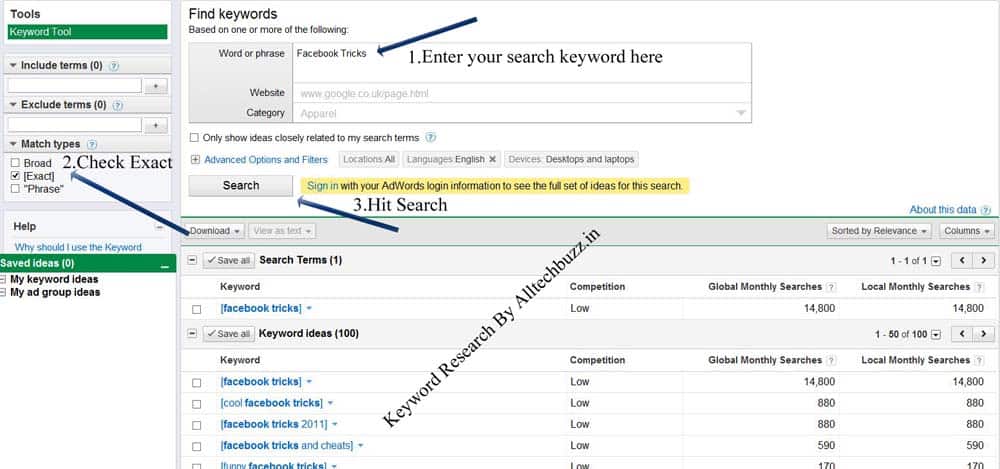
  • To get started with Keyword research go to Google Adwords Keywords Tool.
  • Enter the keyword for which you want to look the monthly search count.
For example I will check the number of searches for “Facebook Tricks” keyword.
  • Enter the keyword and hit search.As soon as you hit search you will be displayed the list of all similar keywords and their global and local monthly searches.But the search which you get is the broad search which also include other keywords like “Tricks Facebook”,”Facebook Trick”,Tricks of Facebook 2012″ etc etc.Many bloggers think that this is the exact traffic for those keywords but its not ,you have to uncheck the Broad search and checkExact. That will give you the exact number of searches for that particular keyword.
    • You can also check the number of searches in a particular country and in particular language.

    Now which Keyword To Choose?

    • It is advised to choose keywords with low competition.After you get results of keywords and their monthly searches just go to google and check the results of keywords in google search results.
    • If you find many top blogs/websites with those exact keywords are ranking high in google then it is recommended to stay away from those keywords if your blog is new or if you dont have much traffic from google.

    Where to use Keywords?

    Use Keywords in Post Title:

    The title of the post decides how much traffic you are going to get.Include most of the keywords in your title instead of conjunctions and prepositions.Don’t use same keywords repeatedly in title.Such cases will be penalised by google and your blog will be effected very badly.

    Use Keywords in the Post:

    You have to use as many keywords as you can in the body of the post.Though keywords in title plays the major role ,content also has its own importance.In the body of the post use those keywords which you didn’t use in your post title but which are similar to that keywords.Keep the keywords density less than 4%.Upto 4% keyword density would work fine but if you use more than that then it may lead to penalty.To avoid penalty by Google Penguin and Panda Updates write posts with more than 700-1000 words.

    Use Keywords in Custom URL structure:

    Avoid using prepositions and conjunctions in url of the post.Use only keywords in the custom url structure for your post.

    Use keywords in Search Description:

    Search description is the description shown in google next to the the title.Use few keywords which you used in the post title for better ranking.

    Use Keywords in H2,H3,H4 etc Tags:

    Use proper keywords in heading tags in your post.Dont use too many but use reasonably.

    Conclusion:

    Though keywords play a major role in search engine ranking, do not over optimize your posts with keywords.Keywords should come naturally.To avoid getting penalised by google write lenghty posts with good number of keywords.Always maintain quality in your posts.
    Many people say that write for readers not search engines but if you don’t have readers from search engines then what is the use of writing posts for readers?So maintain a balance between both. 
    • Also Check:SEO for Blogger Beginners Guide.

    Top 7 Easy Ways to Build Quality Backlinks for Free

    Top 7 Easy Ways to Build Quality Backlinks for Free


    If content is King then backlink surely is queen. I’m saying this, because it has seen that blogs with low quality contents often rank on Google than blogs with awesome content, thanks to backlinks. Backlinks are important factors for SERP’s. Quality backlinks towards your blog can bring lots of free organic traffic from Google and other search engines. By times now, you must have understood the value of backlinks. But, before we further proceed, let’s understand for those who don’t know what is backlink, no-follow link and do-follow link.
    Backlinks: These are the links on someone website/blog pointing towards your own blog. When Google finds your blog url on someone website/blog, it gives you some link juice as a result your blog gets free traffic. But all backlinks don’t carry link juice. Read on below to understand.

    Basically Backlinks are of two types;

    1. Do follow: These are the links which carry link juice.
    2. No follow: These are the links which don’t carry link juice. However, No follow links are also good if you are getting them from high PR (Page rank) websites or from a reputable website.

    How to know whether a backlink is a dofollow or nofollow?

    It is very simple to know, which backlink is dofollow and which is nofollow
    The simplest method to know this is to download this Firefox add-on, NoDoFollow. After installing this add-on, go to any webpage, right click and then click on No-follow. The red colour links are nofollow and the blue colour links are dofollow.
    If you are a chrome user, then use SEOquake inspector for the same purpose.
    Click Here to Understand more about Dofollow and Nofollow Backlinks

    Here are some best methods to get quality backlinks for your blog.

    1.Guest blogging

    This is my favorite method to get backlinks because when you do guest blogging, you not only just get backlinks but you make a relation with fellow bloggers and you also get exposed to a new and larger audience. It is a good practice if you blog on a similar niche blog as yours.  You can easily get from 1 to 3 backlinks to your blog, in your author bio or in the content itself.
    • Submit a guest post on our site.

    2. Links from social media:

    You can easily create backlinks from social media sites such as Facebook, Twitter etc. However, these links are no-follow, but it’s better to have a no-follow link than nothing. Fortunately, not all social sites provide no-follow backlinks, there are some sites which will give a do follow backlink to your blog. Linkedin, Google + and Tumblr are among those sites. Backlinks from these sites won’t increase your traffic largely but these links will give your blog an authority which is good to your blog.

    3. Social Bookmarking Sites

    This another yet simple method to get backlinks for your blog. When you bookmark your own blog on these sites you get backlinks in return. To be honest, these backlinks  generally are not of high quality. However, there are some bookmarking sites which have more authority than others.
    Below I listed many social bookmarking sites with respective page ranks.
    1. wordpress.com – pr9
    2. tumblr.com – pr8
    3. typepad.com – pr8
    4. weebly.com – pr8
    5. blogger.com – pr8
    6. tripod.com – pr8
    7. posterous.com – pr7
    8. jimdo.com – pr7
    9. yola.com – pr7
    10. squidoo.com – pr7
    11. multiply.com – pr7
    12. angelfire.com – pr7
    13. officelive.com – pr7
    14. rediff.com – pr7
    15. wikidot.com – pr7
    16. webs.com – pr7
    17. webnode.com – pr7
    18. salon.com – pr7
    19. edublogs.org – pr6
    20. webspawner.com – pr6
    21. soup.io – pr6
    22. ucoz.com – pr6
    23. travelblog.org – pr6
    24. gather.com – pr6
    25. springnote.com – pr6
    26. webstarts.com – pr6
    27. moonfruit.com – pr6
    28. journalspace.com – pr6
    29. blog.de – pr6
    30. onsugar.com – pr6
    31. quizilla.teennick.com – pr6
    32. areavoices.com – pr6
    33. freeblog.hu – pr6
    34. blog.com – pr6
    35. blogdrive.com – pr5
    36. blogtext.org – pr5
    37. freeflux.net – pr5
    38. freehostia.com – pr5
    39. zoomshare.com – pr5
    40. flixya.com – pr5
    41. webgarden.com – pr5
    42. ohlog.com – pr5
    43. livelogcity.com – pr5
    44. snappages.com – pr5
    45. sosblogs.com – pr5
    46. visualsociety.com – pr5
    47. insanejournal.com – pr5
    48. alivenotdead.com – pr5
    49. hazblog.com – pr5
    50. hpage.com – pr5
    51. blog.com.es – pr5
    52. 350.com – pr5
    53. beep.com – pr5
    54. devhub.com – pr5
    55. blog.hr – pr5
    56. blinkweb.com – pr5
    57. ewebsite.com – pr5
    58. flukiest.com – pr4
    59. bloggum.com – pr4
    60. inube.com – pr4
    61. iseekblog.com – pr4
    62. hipero.com – pr4
    63. blurty.com – pr4
    64. bloghi.com – pr4
    65. wallinside.com – pr4
    66. getjealous.com – pr4
    67. fotopages.com – pr4
    68. wikipages.com – pr4
    69. freeblogspot.org – pr4
    70. myblogsite.com – pr4
    71. spi-blog.com – pr4
    72. 2itb.com – pr4
    73. mytripjournal.com – pr4
    74. blogreaction.com – pr4
    75. doomby.com – pr4
    76. blogge.rs – pr4
    77. mywapblog.com – pr4
    78. yousaytoo.com – pr4
    79. publr.com – pr3
    80. blogster.com – pr3
    81. weblogplaza.com – pr3
    82. spyuser.com – pr3
    83. bcz.com – pr3
    84. iblog.at – pr3
    85. honmag.com – pr3
    86. blogpico.com – pr2
    87. evood.com – pr2
    88. uwcblog.com – pr2
    89. Note: While bookmarking your own page, do not go overboard, as your link building process should be natural. It looks very unnatural for a page to go from having 0 bookmarks one day to having 10 bookmarks the next, isn’t it? I’d recommend you do not bookmark the same page more than twice the same day. Apart from this, don’t just bookmark your own content on these social bookmarking sites otherwise they will ban you. To not get in this situation, also bookmark others content to look natural.

      4. Blog commenting

      Commenting on others blog can easily get you lots of backlinks. But most of the blogs give no-follow backlinks when you comment on them. To check whether a website has do-follow comment system or not, use the above mentioned add-on. I’d suggest you to comment on 7 no-follow blogs and 3 do-follow blogs, means it should be in 7:3. This method ensures that your link building process is gradual & natural. To find out do-follow blogs of your same niche, you can take help of Google.
      Type in Google
      Keyword “comment here” (Replace Keyword with your own blog niche e.g. health “comment here”)
      Keyword “add comment”
      Keyword “submit comment”
      Keyword “add url”
      Keyword “submit url”
      Keyword “submit a site”
      You can also install commentluv plugin for blog commenting if you wish.
      You can also use this tool to find sites to create backlinks

      5.Get Backlinks by Answering and Asking Questions:

      No doubt you can get backlinks by answering questions on various question answer sites like Yahoo answers ,Wiki Answers ,Askmefast ,not only by answering questions but if you are smart you can also get backlinks even by asking questions.Below is the screenshot of the same;
      Some Best Sites to Get Started:

      6.Create Backlinks by Directory Submission:

      This is a very old technique of creating backlinks.These days this is considered as spam by google.Dont over do it .Just choose some good directories and build links.If you over do it then you will be penalized for sure.Below I listed some best auto approval directories.
      • www.directorybahrain.com
      • www.directoryglasgow.com
      • www.unitedarabdirectory.com
      • www.austrlialinkdirectory.com
      • www.directorygerman.com
      • www.westminsterdirectory.com
      • www.digitalwebdirectory.com
      • www.directoryexclusive.com
      • www.diamondwebdirectory.com
      • www.unitedstateswebdirectory.com
      • www.directoryrss.com
      • www.directoryold.com
      • www.dollarsdirectory.com
      • www.msuguccimane.com
      • www.utahhomesandlandteam.com
      • www.saveourelk.org
      • www.mandirigmangpinoy.com
      • www.dmozlinkdirectory.com
      • www.mercyrad.com
      • www.healthilize.com
      • www.gunrunnersgifts.com
      • www.directoryunited.com
      • www.directoryswiss.com
      • www.whitewebdirectory.com
      • www.www.hghlook.org
      • www.unitedkingdomsubmit.com
      • www.clickerdirectory.com
      • www.pakistanlinkdirectory.com
      • www.www.hghenvy.com
      • www.www.hghlive.com
      • www.searchengineslink.com
      • www.www.penisenlargementenvy.org
      • www.secondwebdirectory.com
      • www.goldenwebdirectory.com
      • www.hostinglinkdirectory.com
      • www.specialwebdirectory.com
      • www.goldwebdirectory.com
      • www.standardlisting.com
      • www.chinalinkdirectory.com
      • www.wickeddirectory.com
      • www.canadianlinkdirectory.com
      • www.developerswebdirectory.com
      • www.decentwebdirectory.com
      • www.wickedfiredirectory.com
      • www.blackhatdirectory.com
      • www.businessweblisting.com
      • www.recentrealestate.com
      • www.leedsdirctory.com
      • www.americansdirectory.net
      • www.seoweblisting.com
      • www.regularwebdirectory.com
      • www.regularsubmission.com
      • www.seochatdirectory.com
      • www.recentwebdirectory.com
      • www.indianlinkdirectory.com
      • www.advertisingwebdirectory.com
      • www.hghmist.com
      • www.affiliatewebdirectory.com
      • www.jewdirectory.com
      • www.olderdirectory.com
      • www.sitepointdirectory.com
      • www.tokyolinkdirectory.com
      • www.uklinkdirectory.com
      • www.forumcomputer.com
      • www.phonewebdirectory.com
      • www.directorymanchester.com
      • www.backlinkreseller.com
      • www.directoryeuropean.com
      • www.www.penisenlargementenvy.com
      • www.netbuildersdirectory.com
      • www.internationalbusinesslisting.com
      • www.directoryspanish.com
      • www.directorysydney.com
      • www.directorydelicious.com
      • www.directorykorean.com
      • www.apnitalk.com
      • www.imedia8.info
      • www.egreentechnologies.net
      • www.blueprintsdirectory.com
      • www.japanlinkdirectory.com
      • www.directorysouth.com
      • www.directoryunitedstates.com
      • www.dofollowsocialbookmarking.com
      • www.viewsdirectory.com
      • www.directoryitalian.com
      • www.toyonasic.com
      • www.personalwebdirectory.com
      • www.australialisting.com
      • www.directoryenglish.com
      • www.directorybirmingham.com
      • www.3gdirectory.com
      • www.royalelizabeth.biz
      • www.indexnew.info
      • www.ifreesubmit.com
      • www.directorybritish.com

      7. Help people on the Forums

      This is a give and take method. Here, you will have to sort out people’s problem about which you have knowledge and in return you will be able to get backlinks from these high PR sites. To get backlinks from these sites, firstly, make an account on the following websites. Now, start commenting on the posts about which you have knowledge. When you reach on a certain level or point table, you will be able to leave a link in your comment pointing towards your own blog.
      Note: When you leave a link of your blog on these forum posts, it must be relevant to the post and sort out the problem of the visitors who clicks on those links.
      Some Best Forums List:
      • V7nForuma
      • Siteowners Forum
      • Joomla Forum
      • Search engine watch Forum
      • CNET Forum
      • Mysql Forum
      • Digital point Forum
      • Affiliate Marketing Forum
      • Site Point Forum
      • Warrior forum
      • WebHostingTalk
      • Deviantart
      • File Sharing Forum
      • Geek Village Forum
      • HTML Forum
      • MyGame Builder Forum
      • PhpBB Forum
      • Search Engine Roundtable
      • Black Hat World

    How to Increase Your Blog Traffic in 2016 – Tips and Tricks

    How to Increase Your Blog Traffic in 2016 – Tips and Tricks


    This is one of the most widely asked questions to me on Quora, ATB Forum, Facebook, etc. Even though there are many guides out there on The Internet, still people either tend to be lazy to find out, or they might be anticipating that I might give them some tip that will magically increase their traffic overnight.
    Honestly, speaking there is no one quick fix that can increase your traffic. You need to go through a lot of steps and do R&D for yourself and see what’s working for you.
    As I always say Quality is the king. And there is no point in having quality content on your site when you do not have anyone to read.
    An online business without traffic is like an restarant without customers.

    Broadly speaking there are three ways of driving traffic:

    1. Referral Traffic – Via Email Marketing, Social Media, YouTube, etc.
    2. Search Traffic – Through search engines. Especially, when your blog ranks on the top of major search engines like Google, you tend to drive a good amount of traffic.
    3. Direct Traffic – This is the idealistic scenario, and it would take a lot of time, and you need to build a very giant and unique brand to reach this stage. The way you visit sites like Google, Facebook, Wikipedia, etc.
    I guess by this time you got an idea what are the different possible ways that users can visit your site. Direct Traffic is something that requires a lot of branding and generally many online businesses especially blogs take a lot of time to reach that stage. So, we will skip this off in our tutorial.
    The two best possible ways to drive traffic are via Search Engines and Social Media Marketing.

    How to Drive Traffic via Search Engine Optimization:

    When coming to SEO, the major target would be Google. Other search engines do not have a major search volume and on the other hand, the other search engines have a different algorithm. Targeting two search engines at a time won’t be a good idea. So, for now, we will stick to Google.
    Google, aim would be to show up best results on the top of the search results. In this process, they have developed an algorithm that can automatically filter good websites and show them on the top of the search results for the search query a user enters. The algorithm has about 200 different factors that contribute to the ranks of a website/blog. I won’t be listing out all of them but let you know some major factors that can help you in boosting your traffic;

    Backlinks

    Backlinks have always been the major factor for a very long time. They would still be an integral part of the algorithm for a very long time. Backlinks are a boon and also curse for Google. Backlinks can help in filtering the good results from the bad ones, but in this process spammers tend to abuse Google by building backlinks and outranking Google for many keywords.

    Google says to focus on the quality of the content and backlinks will be generated organically. That means people will automatically link back to you if your blog has great content. But, in the initial days, no one will link back to you as you are relatively new, and another case would be you don’t have great content on your site, so other people are not at all interested in linking back to you.
    My first preference will always be focusing on Quality content and try to generate backlinks organically. There are some strategies that can help you grow organically. This is not just an ethical practise but also makes sure your blog lasts long.
    Tips for Organic Link Building – InfoGraphics, Making Videos, Content Marketing, Guest Blogging.
    The other way is building links for yourself. Often, considered as a black hat practise and can lead you in serious trouble in long run.
    Black Hat Link Building Methods – Buying links from Fiverr/SEO Clerks, Paid posting, Paid Guest Posting, Article submissions, Directory Submission, Site Wide Links, Blog Commenting.

    Proper Title, Permalink and Meta Description:

    Most of the webmasters tend to leave the title and description default. But, that won’t help you in getting the maximum benefit. You need to have a custom permalink and a Google Search Title and Description. For this purpose, I would recommend Yoast SEO Pugin.
    Additionally, you have to no-index tags, archives and unwanted pages from getting listed in Search engines. This can also be done with SEO by Yoast.

    Proper Usage of Keywords:

    You should do a quick keyword research before you start writing down an article. Most of the times the keywords that people tend to search are obvious but in some cases, you have to get an idea of what keywords people are looking for in Google Search.

    Move to HTTPS

    Google has recently made it clear that SSL is one of the ranking factors. So, make a move right now.

    AMP – Accelerate Mobile Pages

    This is similar to Instant Articles. People who moved to AMP have an unfair advantage over others. Google shows up these results on top for mobile users.

    How to Drive Traffic via Social Media?

    Social Media is vast these days and almost everyone on Internet use some or the other social media network. It might be Facebook, Twitter, Quora, YouTube, Reddit, Tumblr or Stumbleupon. All these platforms can drive a massive amount of traffic.
    The major area which you can focus on driving traffic via Social Networking sites is Facebook.

    How to Drive Traffic from Facebook?

    Driving traffic from Facebook is relatively easy and as we all know that Facebook has crossed 1.2 Billion users. So, there is a huge opportunity for you to make use of the same. Along with this Facebook is a little liberal and more inclined towards businesses.
    You can have your own Groups, Pages to promote your products or website.
    The best way to achieve this is through building Facebook page(s). If you have a good Facebook page with a decent reach, then you can promote your blog links on that page and drive traffic.
    As you can see above we have shared one of our articles on our page and the audience who are interested in the article, will follow the link and visit the forum.
    The other potential traffic sources are Twitter, Google Plus, Reddit, Stumbleupon, Quora, etc.
    What works for me, might not work for you. It depends on many factors like the area of your expertise, your niche, your audience, etc.
    Another topic is Email Marketing. All you have to do is collect the emails of the people who are visiting your blog via some marketing software like AweberMailChimpGetRespose, etc. Mail them on a regular basis about your latest updates. Email marketing works only in a long run and doesn’t give you results instantly. You should have a lot of patience in this process.